The problem
We record tutorials, and for a long time the routine was the same. Record the screen in one app, record the webcam in another, then open an editor and line the two up, hoping the voice still matched the mouse.
It works, but every video costs an extra round of editing before it can go anywhere, and the screen recorders we used weren't designed around people who explain things on camera.
So the brief was simple to say and harder to build: record your screen, your voice and your face in one click, and get one MP4 that's ready to upload.
What we built
A native Windows app, using the graphics card
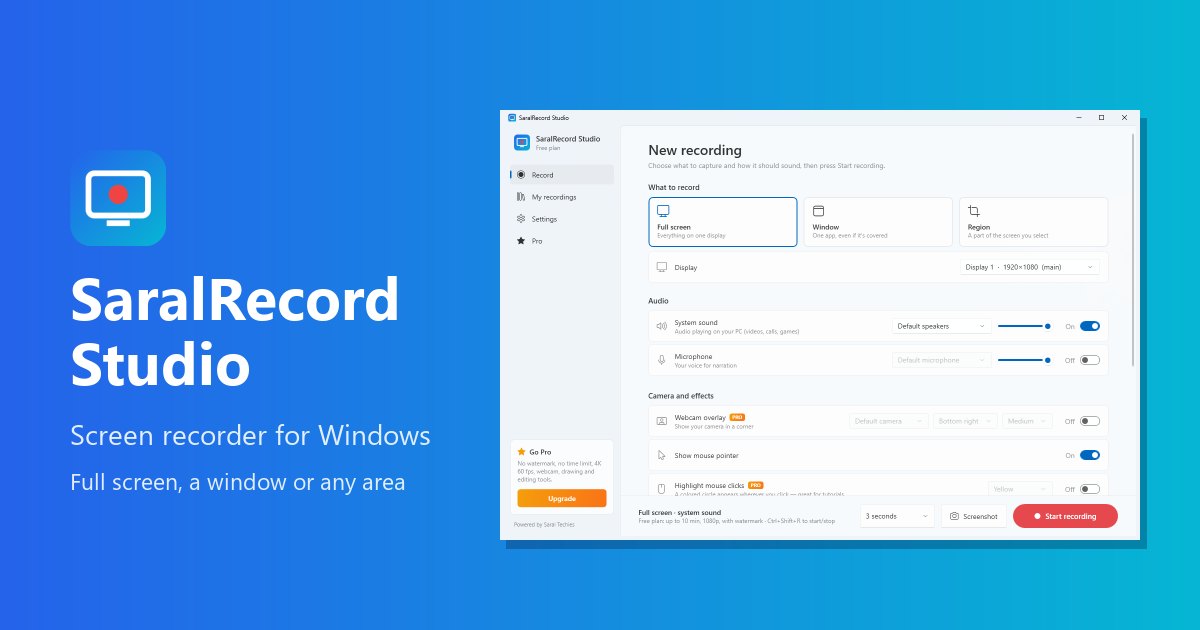
SaralRecord Studio is a WPF app on .NET 10 with the Windows 11 look, built on ScreenRecorderLib, an open-source library that uses Windows' own Media Foundation encoder. That means the graphics card does the heavy lifting, so recording doesn't slow down the app you're demonstrating. It runs on Windows 10 and 11, on both regular x64 PCs and ARM laptops.
Instead of asking people to pick a bitrate, the app works it out from the size of the recording, the frame rate and a simple quality choice, and caps it between 1 and 100 Mbps. Most people never need to think about it.
Sound that's easy to balance
System sound and your microphone are recorded as separate sources, each with its own volume, so a loud notification doesn't drown out your voice. Mouse clicks can be highlighted with a small ring, which helps viewers follow along.
Your face in the same recording
Version 1.0.3 finally solved the problem we started with. Click Camera, check yourself in a live preview, and the webcam goes into the same MP4 as the screen, so there is nothing to line up afterwards. The app opens the camera itself and can blur the room behind you, using a small person-detection model that runs on the PC's processor. Camera images never leave the computer.
Noise reduction came in the same release. A ceiling fan or an AC is hard to switch off in a lot of rooms, so the app takes steady noise like that out of your voice. When you stop, a short clean-up step, about two seconds per minute of video, rebuilds the sound track and copies the video across without re-encoding it, so the picture loses nothing and the voice stays in sync.
Small edits without opening an editor
Trimming, turning a recording into an MP3, making a smaller 720p copy and exporting a GIF all happen inside the app, using Windows' own media tools with hardware acceleration. The GIF export needed its own code: the standard Windows GIF encoder can't store the delay between frames, so animations played at the wrong speed. We write each frame ourselves and stitch them together with the right timing and a loop.
Free, with a Pro upgrade
The free version records up to 10 minutes at 1080p and 30 frames a second, with a small watermark, and includes the face cam in the bottom-right corner with background blur. Pro removes the limits and adds 4K and 60 frames a second, the smaller HEVC format, the face cam in any corner or Large with backgrounds, drawing on screen, your logo, scheduled recordings and the editing tools. Pro can be bought in the Microsoft Store or with a licence key from our website. A key works on three PCs, is only created after the payment is confirmed by the payment gateway itself, and keeps working offline for up to 30 days between checks.
Where it stands
SaralRecord Studio went live on the Microsoft Store on 19 October 2026, and version 1.0.2 added Pro licence keys bought on our website. The project includes smoke tests that run trim, GIF, MP3 and compress on a real recording, so the editing tools are checked against an actual video file rather than a mock.
Version 1.0.3 brought the face cam and noise reduction, which closed the loop on the problem that started the project: screen, voice and face in one file.
A few honest notes. The face cam is a rectangle, with no round bubble or green screen, and the edges of a blurred or replaced background can look soft. Noise reduction handles steady noise like a fan or hum, not music or people talking. The Store package is large, because it carries both the x64 and ARM versions. Recording needs Windows 10 version 2004 or newer. And Pro unlocks only in a Store install or with a valid licence key.