
Find broken links and images in one click.
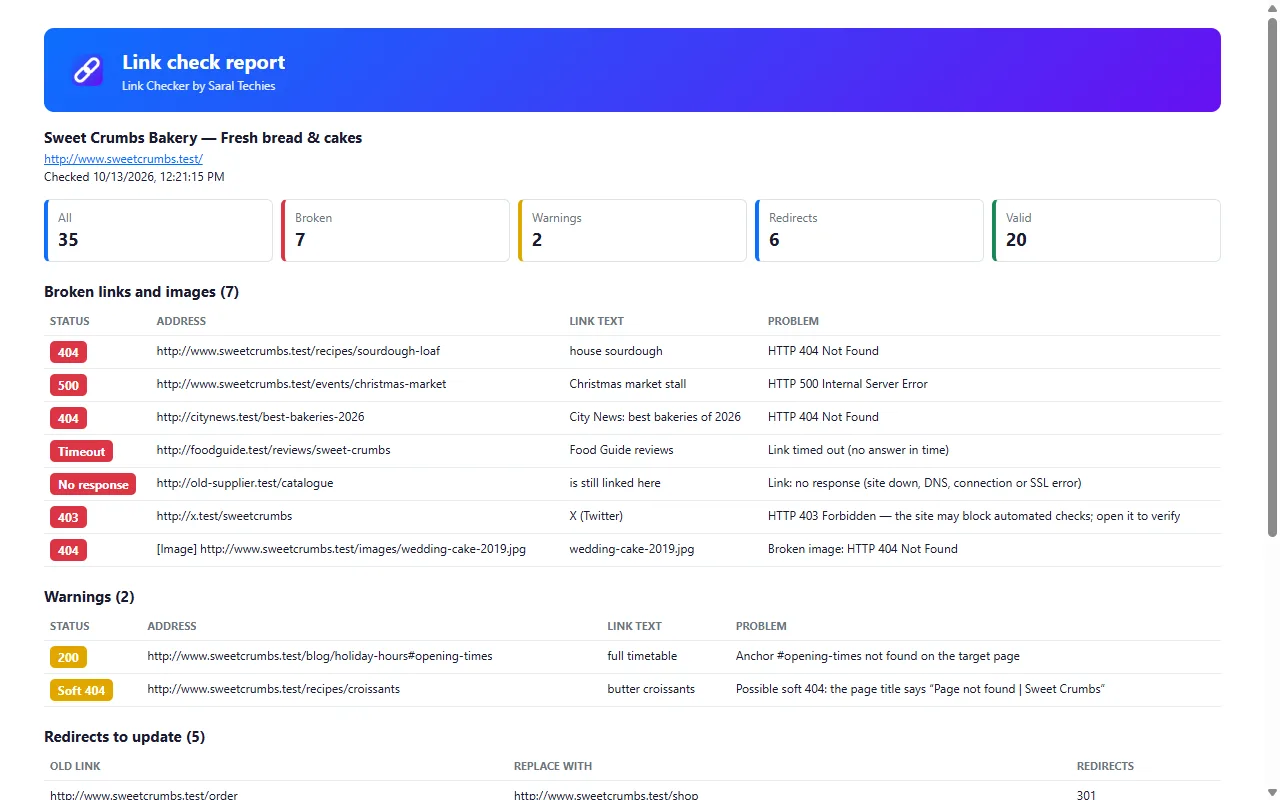
Checks every link and image on a page in one click and highlights what works, what redirects and what is broken. It also finds soft 404s and redirect chains, audits your link SEO and gives you a report to send to a client.
- Free, no account
- Nothing is sent to us
- Only runs when you click it
See it in action
What Link Checker does
One click to check
Click the icon or press Alt+Shift+L on any page. Click again and every highlight disappears.
Highlights on the page
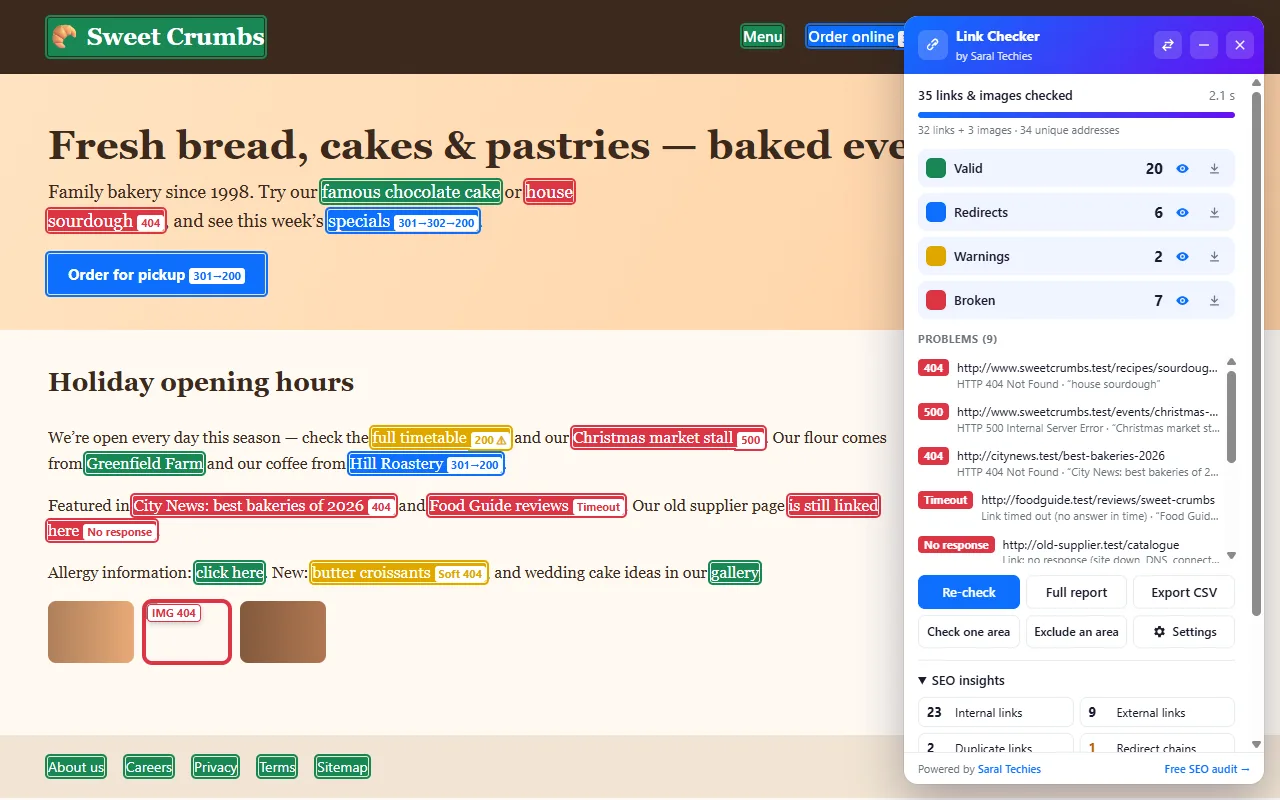
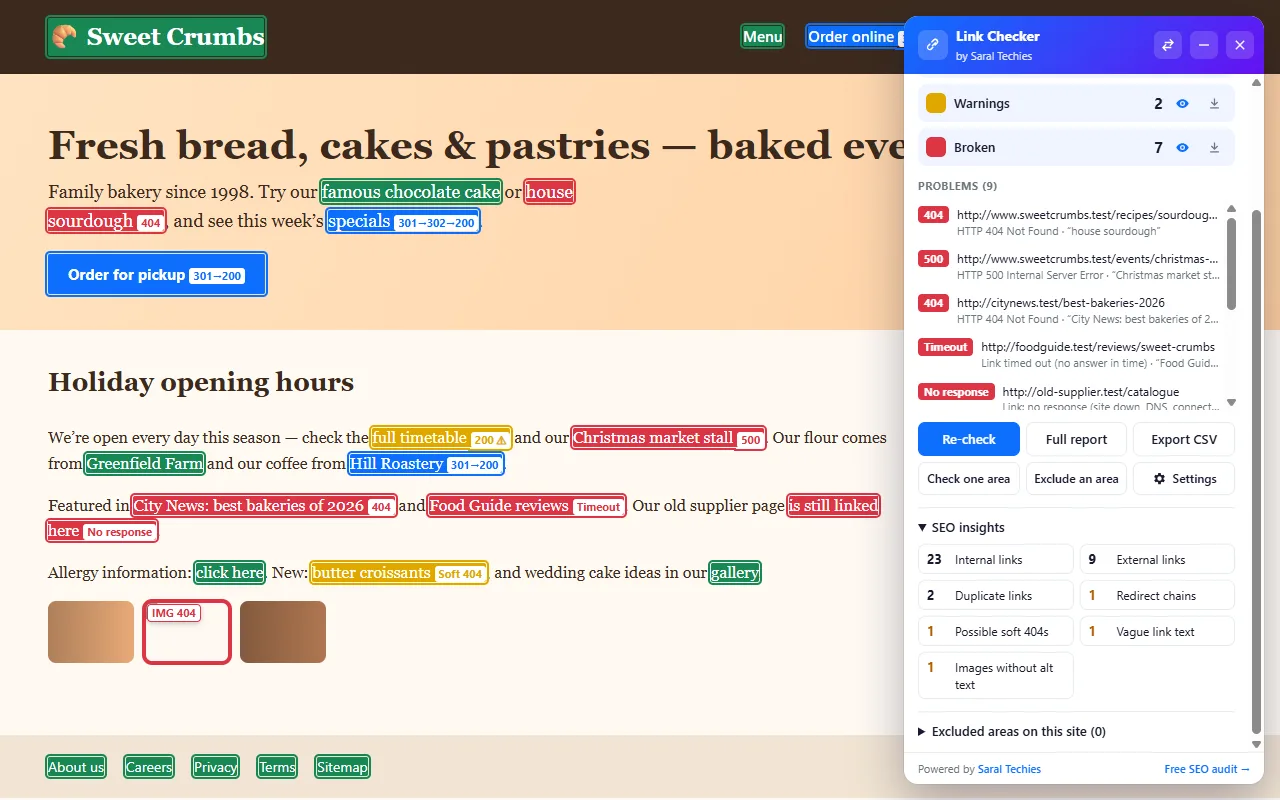
Links are coloured where they sit on the page, with tags such as 404, 301→302→200 or Timeout on the ones with problems.
Broken images too
Every image is checked, including lazy-loaded ones. Broken images get a red outline and an IMG 404 tag without moving anything on the page.
Redirect chains and fixes
See every hop of a redirect and the final address. Export a “Redirect fixes” list of old link and new address, ready for your editor.
Soft 404s
Finds pages that say “Page not found” but still answer 200 OK, and deep links that quietly send visitors to the home page.
SEO link insights
Internal and external links, nofollow and sponsored links, insecure http links, vague link text, images without alt text and duplicates.
Check one area
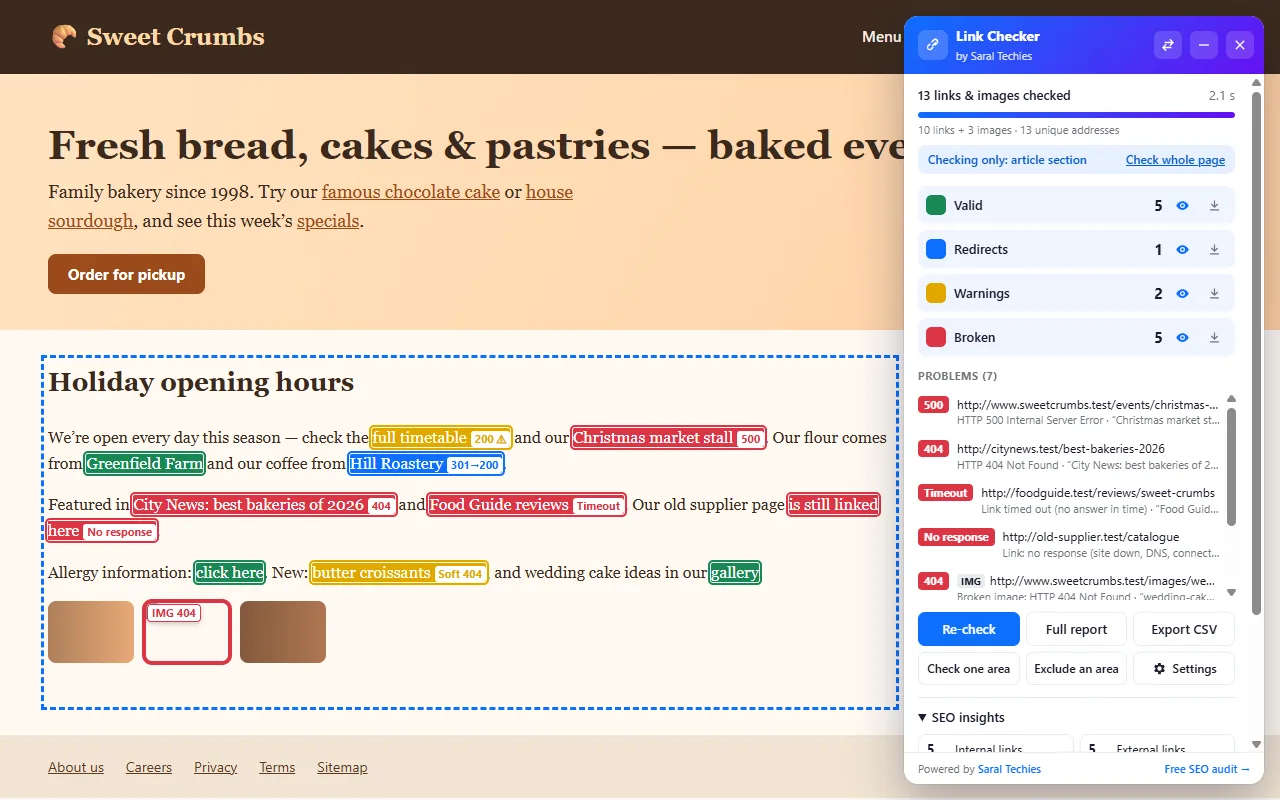
Choose a section, such as the article, and check only the links inside it.
Skip the same parts every time
Exclude the header, menu or footer on a website once, and they’re skipped on every check of that site.
Anchor and empty links
Flags #anchor links whose target is missing, on this page or the linked one, plus href="#" and empty links.
Full report
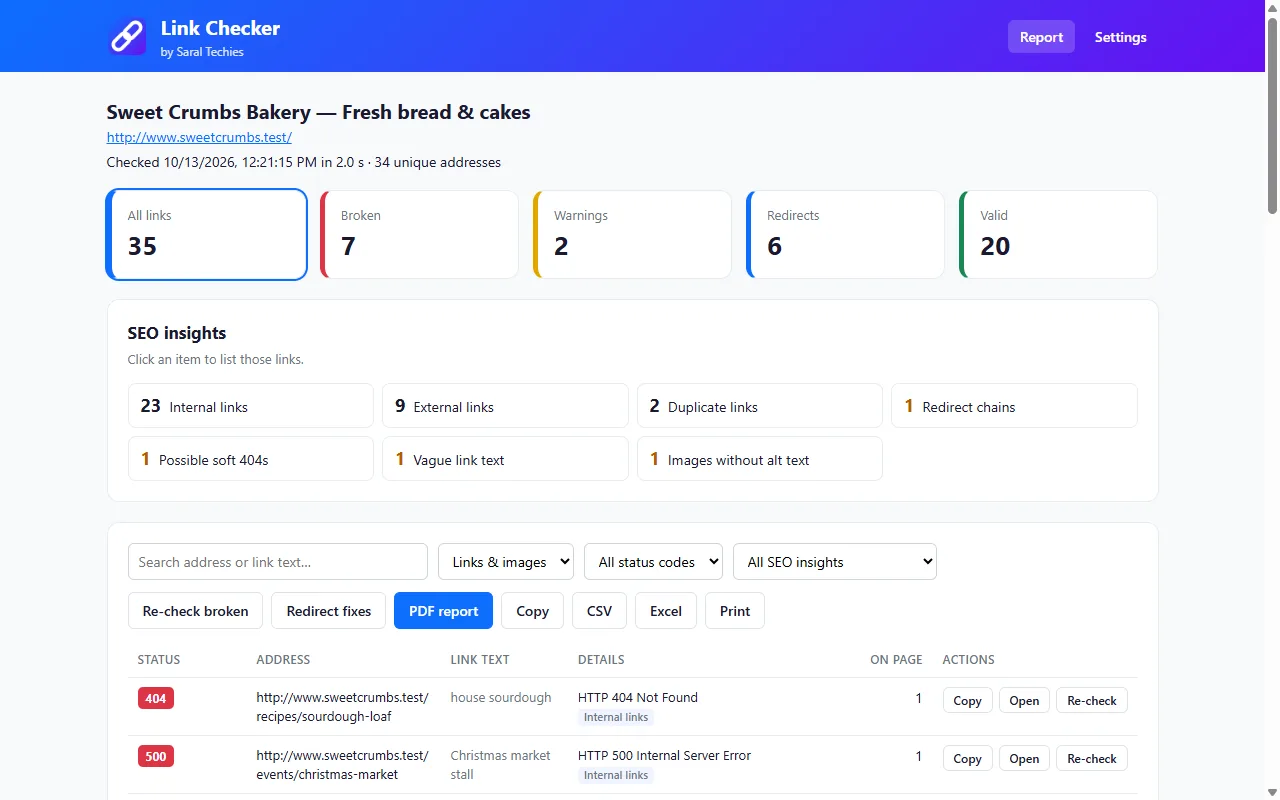
Filter, search and sort every result. Re-check broken links with your own cookies, then export to Excel, CSV or the clipboard.
Branded PDF report
Save a tidy PDF with the summary, broken links, warnings, redirects and SEO insights to send to a client or your team.
Docs, Sheets and iframes
Finds links inside Google Docs and Sheets, same-site iframes and web components, not just the main page.
What the results mean
- Valid
- The address answered with a success code (usually 200 OK). Nothing to do.
- Redirect
- The link works but passes through one or more redirects (301, 302, 307 or 308) first. Update the link to the final address so visitors and search engines get there in one step.
- Warning
- The link loads, but something is off: the #anchor it points to is missing, the page looks like a “not found” page, or the link is just “#” or empty.
- Broken
- The address returned an error such as 404 Not Found or 500 Server Error, or didn’t answer at all.
- Soft 404
- The page answers 200 OK but its title or heading says it can’t be found. Search engines treat these as broken, so they’re worth fixing.
- Timeout and No response
- The site took too long to answer, or couldn’t be reached because of a DNS, connection or SSL problem.
- 401, 403, 429 and 999
- Some sites, such as LinkedIn, refuse automated checks. These links may work fine in a normal visit, so open them to make sure, or use Re-check broken with your cookies.
Green, blue, amber or red
Problem links also get a small tag such as 404, 301→200 or Timeout. You can change the colours in the settings and hide any group, so the page shows only what needs fixing.
Made for
- SEO specialists
- Agencies
- Web developers
- QA testers
- Content editors
- Website owners
How to use it
Install Link Checker from the Chrome Web Store. It’s free and needs no account.
Click the puzzle-piece icon in Chrome’s toolbar and pin Link Checker so it’s one click away.
Open the page you want to check and click the icon, or press Alt+Shift+L. Results appear within seconds.
Click a problem to jump to it, open the full report, or save a PDF to send to whoever fixes the links.
Private by design
Link Checker only runs when you click it. It checks links straight from your browser, sends nothing to Saral Techies and has no analytics. Your settings and excluded areas are saved only on your own computer. We can't see which sites you visit, and we don't want to.
Read the privacy policyGet an email when Link Checker is updated
What's new in each version, in one short email. You'll also get our occasional newsletter. Unsubscribe from either any time.
Found broken links on your website?
Broken links lose visitors and waste the time search engines spend on your site. We fix broken links and redirects, tidy up site structure and take care of the rest of your SEO. Start with a free SEO audit, or ask us to take a look.
Questions about Link Checker